If your monitoring still ends with an alert and a human squinting at a dashboard, you’re already behind. An alert is your system telling you a customer is having a bad time, then asking you to go deal with it whenever you get round to it. Agents can now click through your product as every kind of user, find what’s broken, fix it in their own sandbox and send you the proof before a customer ever notices. So the question is simple: are you proactive about your customer experience, or are you waiting for someone to complain? One night in October I found out which one I was.
At 2:41 am, three agents started using the product I work on as every kind of user it has. Owners, managers, inspectors, read-only users, someone who belongs to two companies, someone who belongs to none. By 6:01 am they’d found 35 bugs and merged 13 fixes, each one checked visually in its own sandbox before it went in. I didn’t approve a single fix.
Here’s one of the first things they found. An agent ran a real inspection of a kitchen, and this is the report that came back.
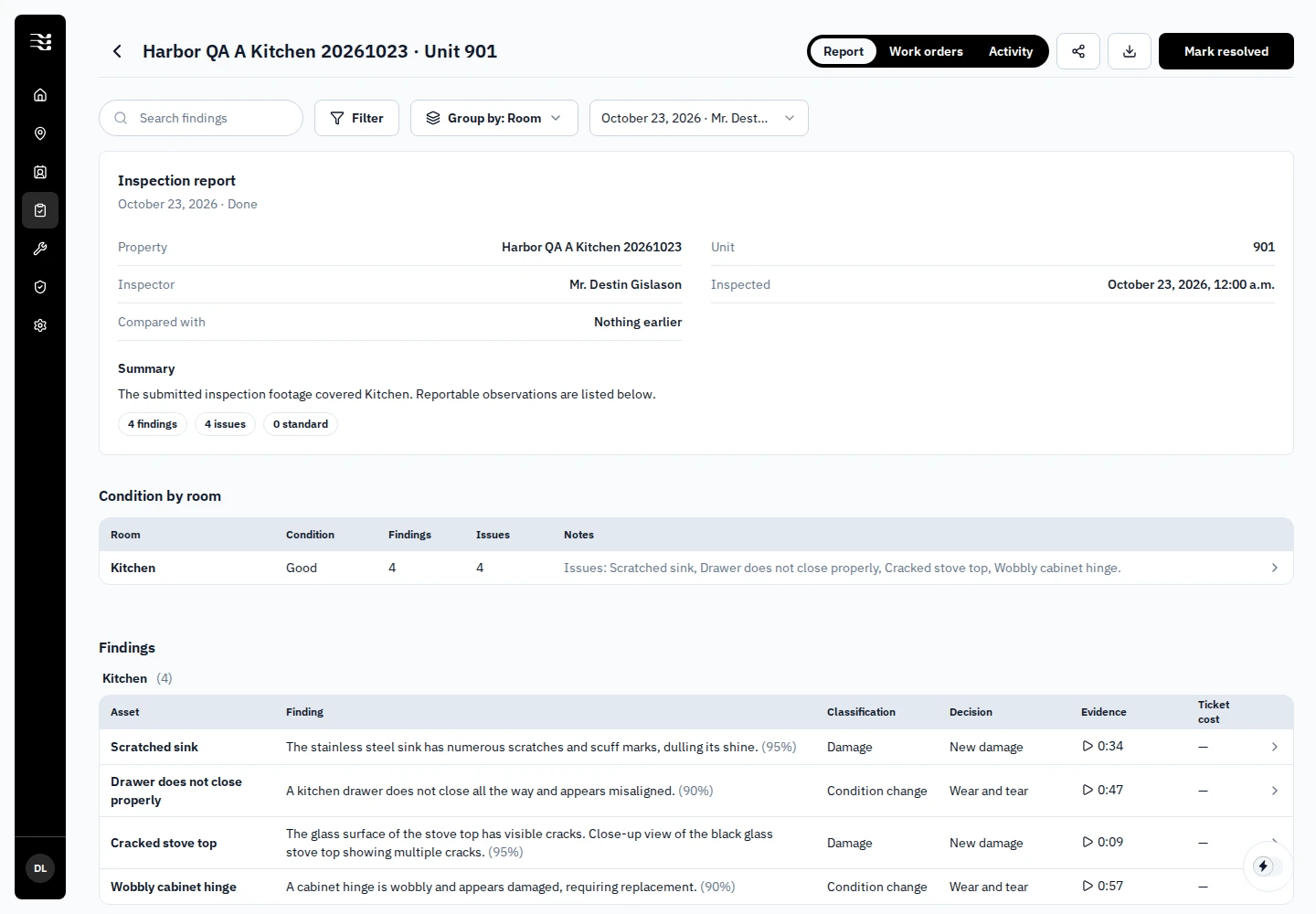
Scratched sink, cracked stove top, a drawer that won’t close, a wobbly hinge. Condition: Good. No alert fired, because nothing crashed. The only way you catch that bug is by being the person reading the report.
How I built it
Write down what good looks like, before anything breaks
This is the part that meant I didn’t have to approve anything. Before the run I’d documented the user journeys that matter, role by role. I also had a reference build of the app running in a mock mode that already showed the correct behaviour on screen, with the performance numbers it should hit.
So every agent knew what the landing was. “The Locations card shows 13 inspections.” “An inspector can’t open the team page.” “The board loads in under half a second.” When an agent fixed something, it wasn’t asking me whether the fix was right. It was checking the screen against a picture of right that already existed.
Approval is what you need when nobody wrote down what success looks like.
Build a fake world inside production
Most bugs don’t live on the happy path. They live in states nobody sets up by hand: the inspector who shouldn’t see the team page, the manager in one company who’s read-only in another, the account with no company at all, the brand-new company with no data.
So I seeded a small fake world straight into production. Three synthetic companies, 15 personas, and a handful of deliberately weird accounts. A few tricks make failures loud instead of quiet:
The second company reuses the first one’s names and unit numbers, so if data leaks across companies it shows up as wrong data instead of nothing.
The third company stays completely empty, so anything that appears there is a bug by definition.
Before any testing, a probe fires about 1,200 requests at the boundaries between companies and roles. If one of its own control checks fails, it marks the whole result invalid instead of quietly passing. On the night one control did fail, and the probe said so.
Let agents use the product like real people
Three agents ran in parallel, split by role. Each one drove a real browser against the deployed production app from its own short-lived cloud VM, and every bug came back with steps, expected versus actual, a screenshot and the request IDs.
Two things told me the setup was honest. All three agents independently found the same two bugs, from three different directions. And the boring result: 232 attempts to read another company’s data, every one refused. Nothing crossed between companies.
Fix it in a sandbox, prove it against the reference
Every bug got its own agent and its own PR. Each agent spun up a fresh Boat VM with its fix, clicked through the same journey as the right user, and compared the screen against the reference. An independent reviewer graded the screenshots before anything merged. A typical run took about 10 minutes and cost about 0.6 cents.
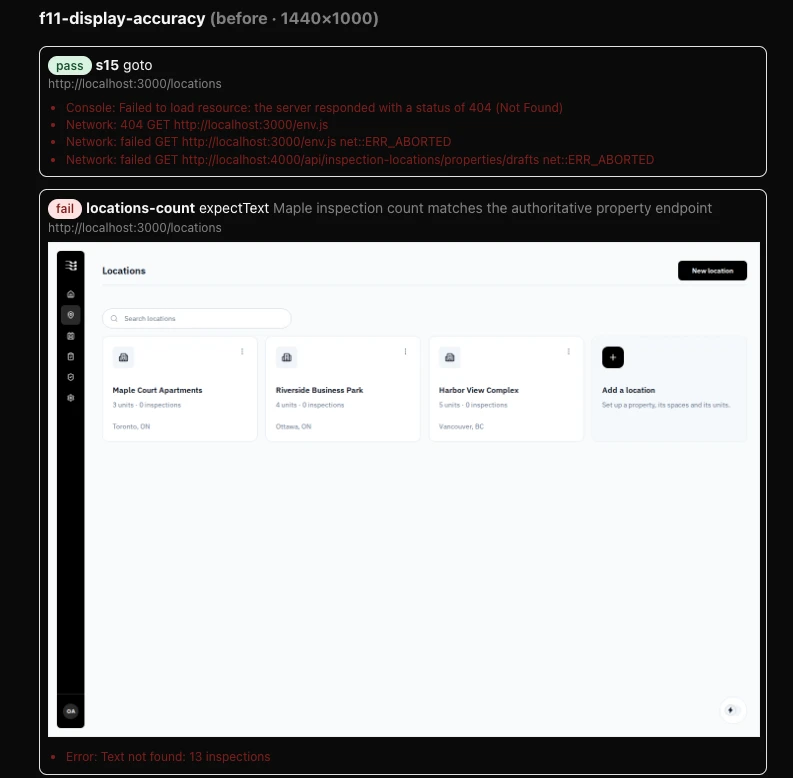
Here’s one. Before the fix, the Locations page said “0 inspections” for a property with 13 of them, so the check fails.
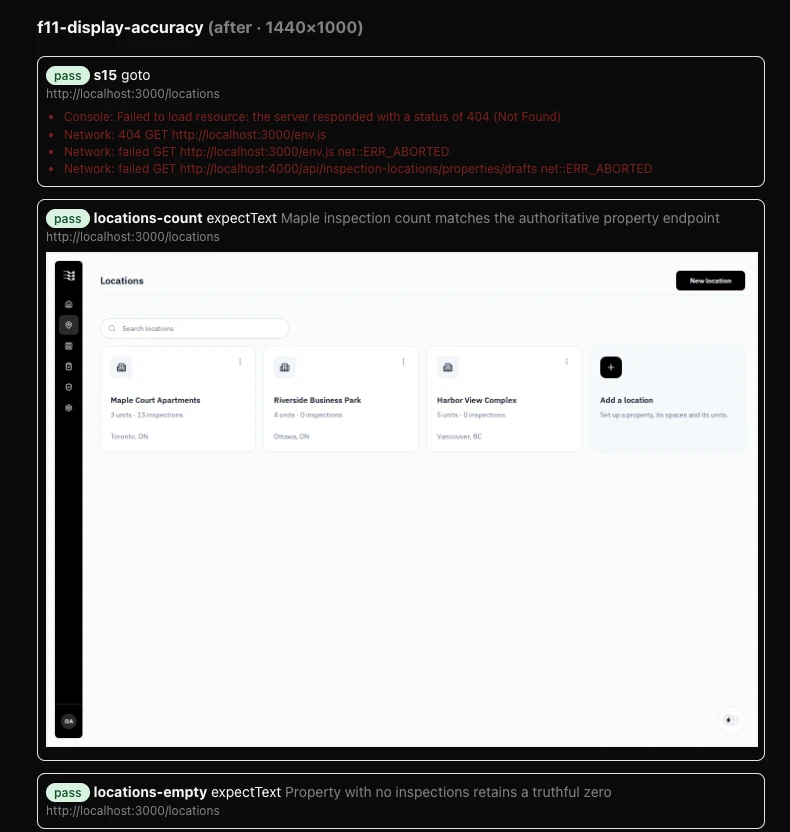
After the fix: same journey, same check.
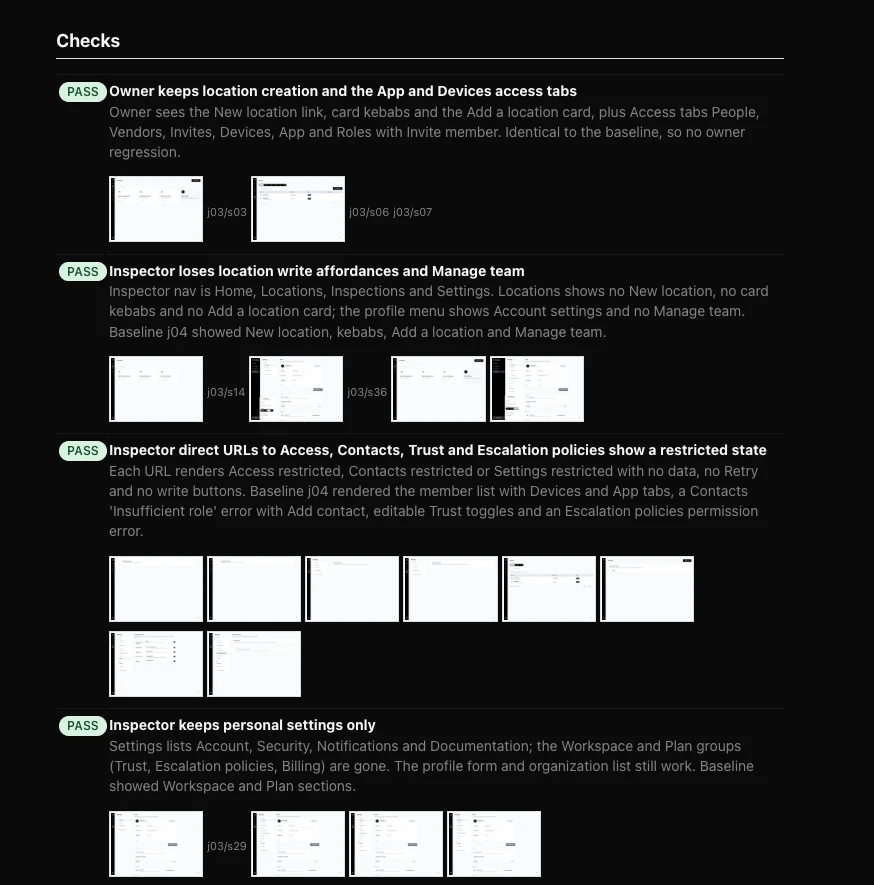
Role checks work the same way. The report doesn't just say "permissions fixed". It shows the owner keeping everything they had and the inspector losing exactly what they shouldn't have had, screen by screen.
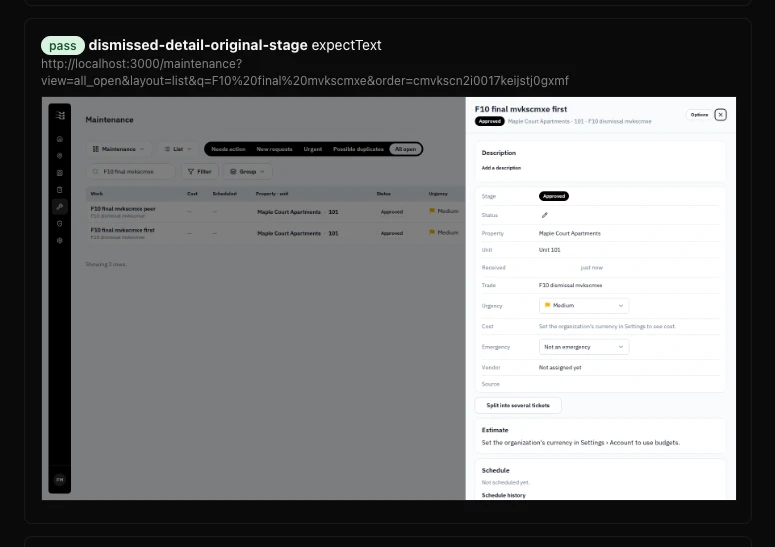
Small behaviour gets the same treatment. A dismissed maintenance request has to keep its original stage when you open it again.
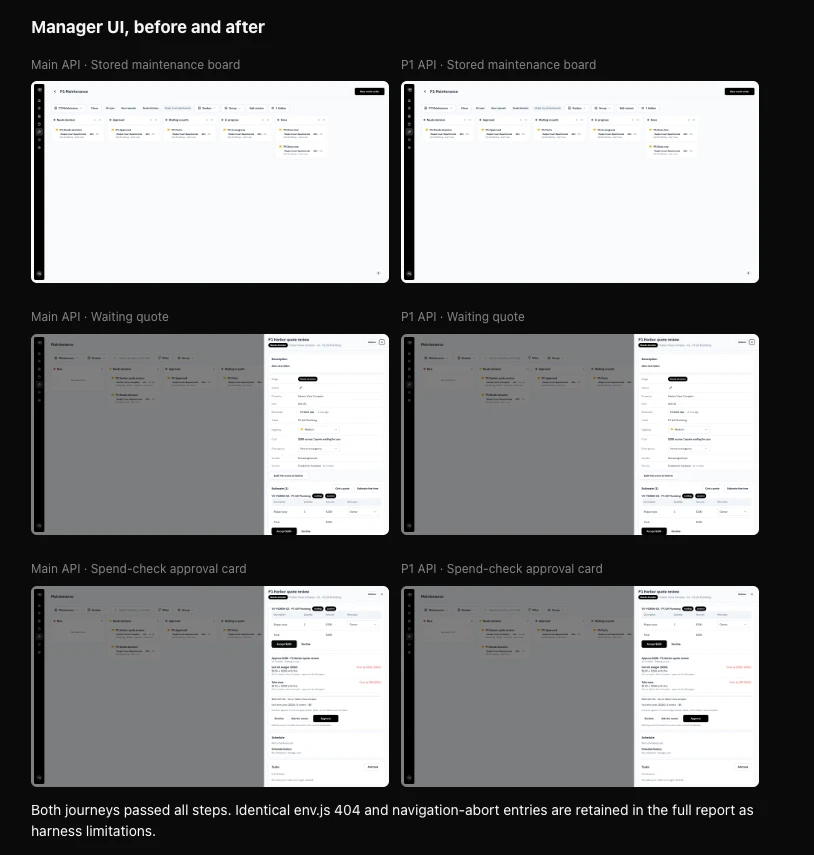
So does performance, with the current build and the fixed build side by side.
Let the verifier say no
Twice that night, a fix failed its own sandbox check and went back. The avatar upload fix passed code review, then failed in the VM on a storage edge case. The repeat-inspection fix, the one behind that “Good” kitchen, failed because a renamed room split in two. Both were fixed and re-verified before they merged.
If your agents never fail their own checks, your checks aren’t checking anything.
Run it again on the live release
After I deployed, the same world ran a regression pass against the live release: 17 checks covering all 13 fixes, then a separate verifier agent that had to reproduce every major finding from scratch.
It caught a real regression. The avatar fix had worked in the sandbox, but in production the saved image came back blank after a reload. It also found a new problem in how a repeat inspection compares against the first one.
Once I said “fix everything”, three agents had nine PRs ready in under half an hour, visually checked wherever the sandbox could reproduce the journey. A fourth agent redesigned every transactional email and had it visually verified in 14 minutes.
Where I still sit
There was still a human in this, and I’d rather say exactly where. I kept one gate on purpose: the production deploy. The agents stopped and waited for me instead of overriding a workflow I’d switched off. I also had CI paused that day, so the evidence for each merge was code review plus visual verification, not a test suite.
The fixes themselves didn’t need me, because the definition of done was already written down. That’s the bit to copy.
Why proactive wins
Most unhappy customers never tell you. Qualtrics surveyed 20,001 consumers in 14 countries in 2025: fewer than one in three give companies feedback, and 34% quietly spend less after a bad experience. PwC found that 32% of customers globally would walk away from a brand they loved after one bad experience. So that “Good” kitchen doesn’t come back to you as a ticket. It comes back as a renewal that never happens.
Getting there first pays. Gartner surveyed 6,004 customers in 2020 and found proactive service led to “significantly better customer experience outcomes”: lower effort, higher satisfaction, higher NPS. Only 13% of those customers said a company had reached out to them first. Bell Canada did the human version. It mined its call data, worked out which problem a customer would call back about next, and dealt with it on the first call. Repeat calls per issue fell 16% and churn fell 6%.
Amazon built the automated version over a decade ago. Its systems look for experiences that weren’t up to standard and refund the customer before they ask. Bezos wrote that doing it proactively “is more expensive for us, but it also surprises, delights, and earns trust.”
Speed is part of the experience too. In Deloitte’s 2020 study for Google across 37 brands, a mobile site 0.1 seconds faster went with 8.4% more retail conversions. That’s why the performance targets sit in the reference build, right next to the screens.
And fixing it after the complaint doesn’t buy the customer back. A 2007 meta-analysis of the “service recovery paradox” found that a good recovery lifts satisfaction but makes no significant difference to repurchase intentions or word of mouth. The win is the customer never hitting the bug at all.
Alerts are a symptom
An alert is a to-do item for a human. It made sense when the only thing that could fix production was a person. That stopped being true.
The bar I’m working towards: something breaks for a customer, and within 10 to 15 minutes there’s a verified fix waiting, with screenshots proving it matches what good looks like. The email redesign was ready inside that window. The rest of the loop isn’t far off.
How to start on Monday
Write down what good looks like, visually. Journeys per role, a reference build that shows the right screen, and the performance numbers you expect. Without this, every fix needs your approval.
Seed a world with every kind of user. Especially the weird ones: two companies, no company, an empty company, read-only.
Make agents prove fixes in a sandbox. One bug, one agent, one PR, one VM, screenshots compared against the reference, and an independent grader that’s allowed to say no.
Then let it run tonight, and read the report with your coffee.
If your customers are still your QA team, that’s fixable. I build these loops for companies: the reference, the test world, the agents and the gates. Reach out at hello@humza.io